
Getting money in takes a minute. Choosing the wrong way to do it can cost you four percent, and choosing the wrong network can cost you everything you send. Both are avoidable, and neither is obvious from the screen.
Guide 2 of 5. Screens as of August 2026. Covers Polymarket Global.
No account yet? That’s guide 1. And there’s no rush: browsing markets with an empty balance is free.
Three ways in, and what they really cost
Click the blue Deposit button. The window has two tabs, Use Crypto and Use Cash, and underneath them three genuinely different routes.
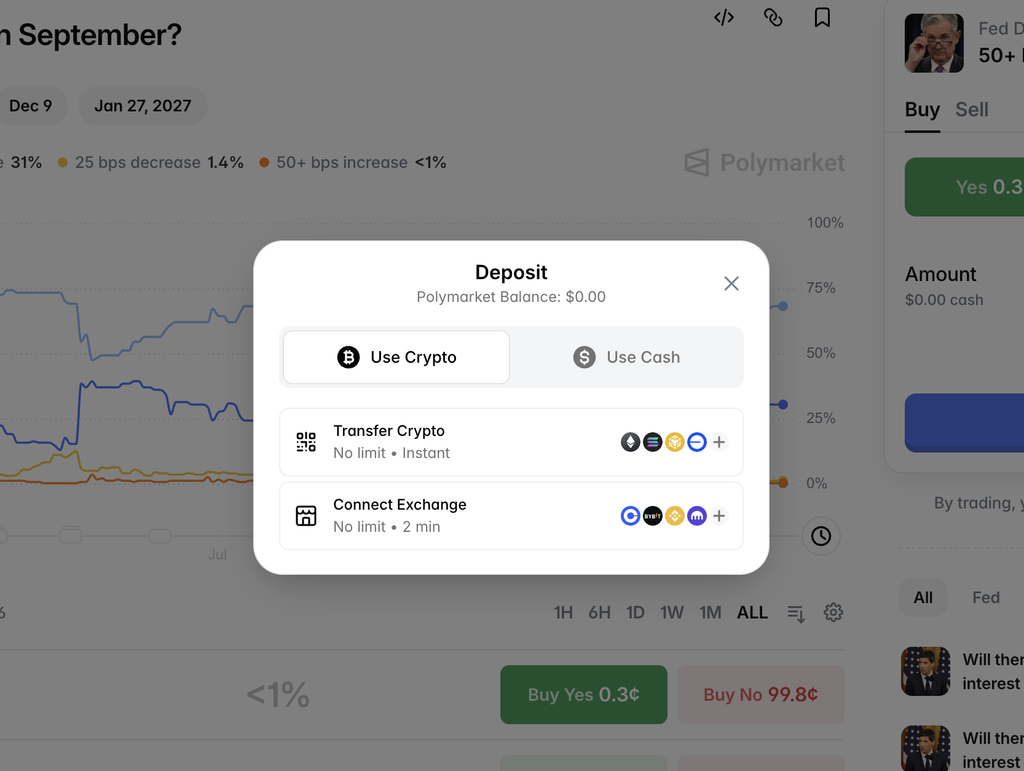
| Route | Speed | What it costs you |
|---|---|---|
| Use Cash (card, Apple Pay, Google Pay, Cash App, bank) | Instant, except bank transfer at 1–2 days | Around 3.8% by card |
| Transfer Crypto (send USDC yourself) | Instant | Network fee, often literally zero |
| Connect Exchange (link Coinbase or Bybit) | About 2 minutes | Network fee |
Short version: if you already hold crypto anywhere, use it. The card route is for people who have none, and it’s the most expensive door in the building. The rest of this guide explains why, because the screen won’t tell you.
What a card deposit actually costs
Pick Use Cash, then Card, and enter $100. The screen gives you a tidy breakdown: processing fee $2.16, network fee $0.02. Two dollars and change on a hundred. Reasonable.
Now look at the top of the same screen. For your $100 you receive 96.20 USDCe.
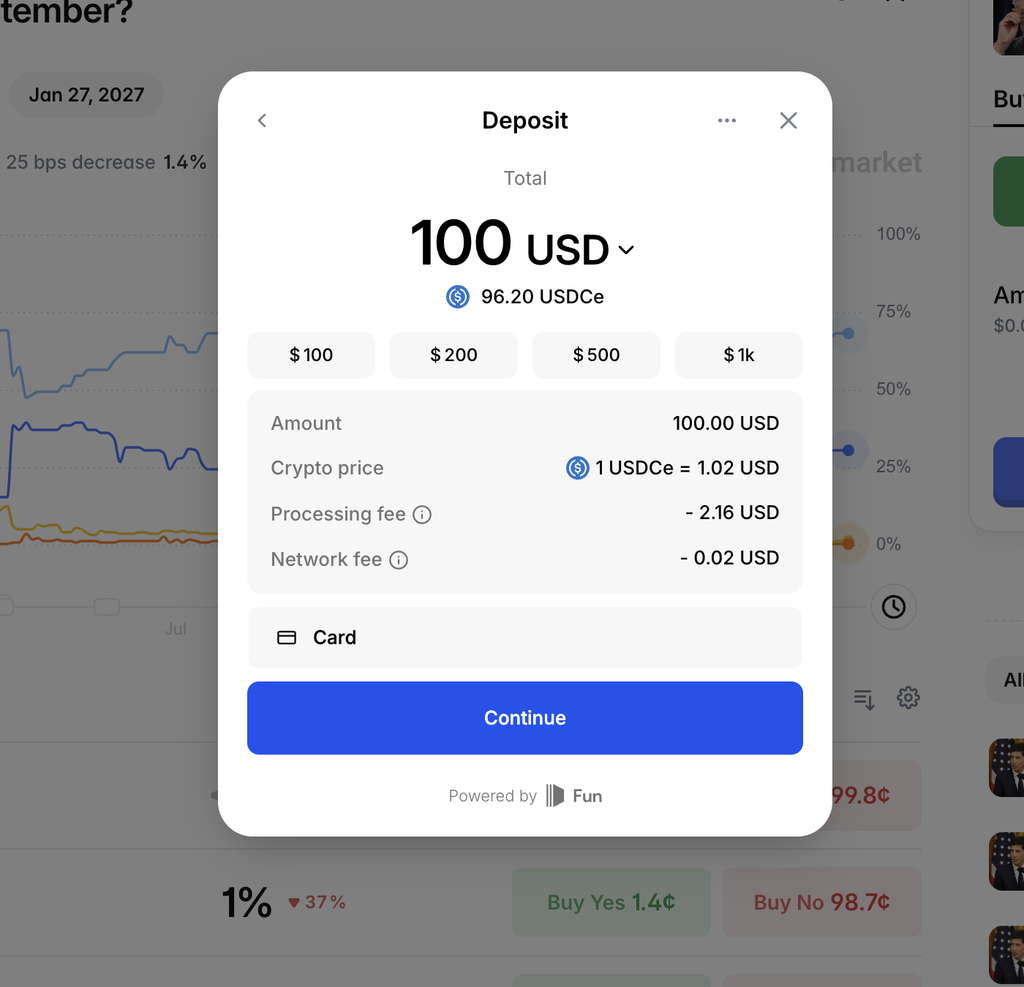
That’s $3.80 gone, not $2.18. The missing $1.60 is sitting in the line between them: 1 USDCe = 1.02 USD. USDCe is a dollar-pegged token that trades within a fraction of a cent of a dollar on the open market. Pricing it at $1.02 builds a markup of roughly 2% into the exchange rate, where nothing labels it as a cost.
Nothing is hidden here. Every number is on the screen, and the payment provider (Fun, named at the bottom) is entitled to charge for its service. But the lines with the word “fee” beside them add up to a little over 2%, while the transaction costs nearly 4%.
The habit that protects you, on any platform and any payment method: ignore the fee lines and compare two numbers only. What leaves your card and what lands in your balance.
For scale: on $100 the difference is about $4. On $1,000 it’s about $40. That’s a lot of tuition to pay for speed. That is before you trade. What trading itself costs is a separate bill.
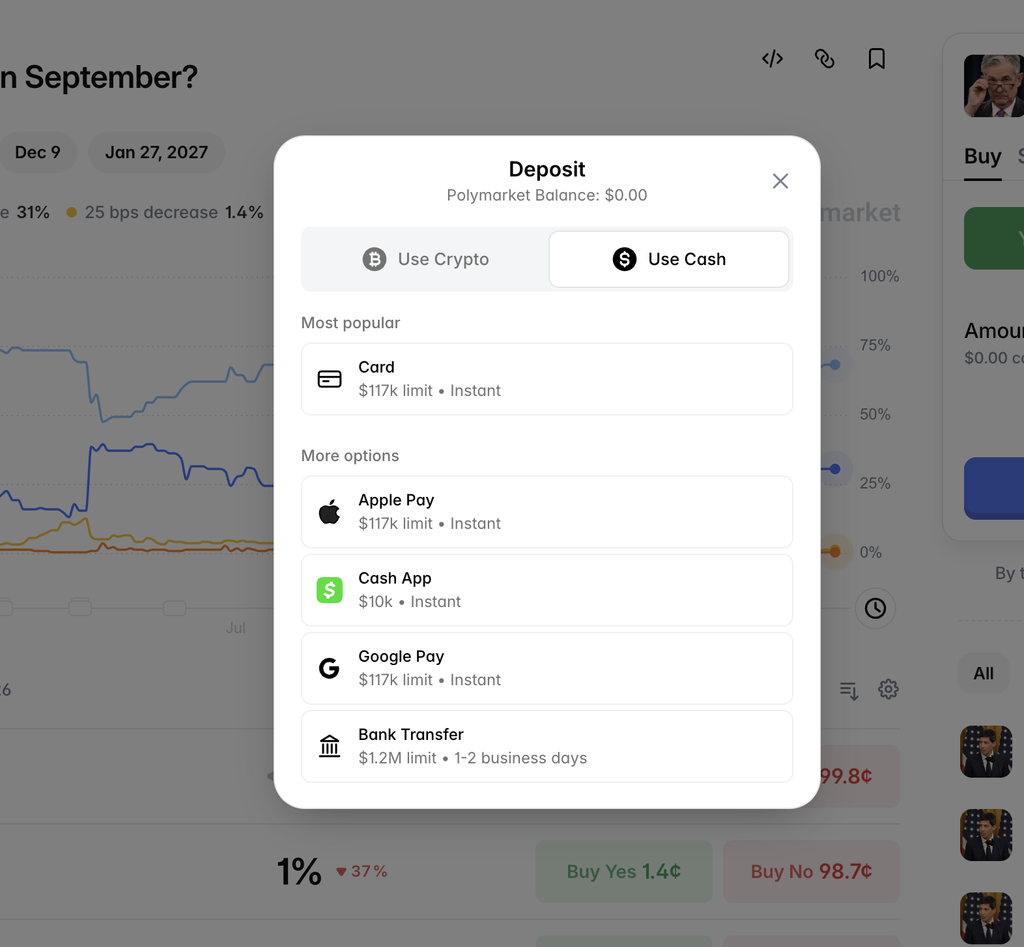
The other cash routes differ mainly in speed and limits. Apple Pay and Google Pay are instant with a $117k limit, Cash App is instant up to $10k, and bank transfer takes 1 to 2 business days with a $1.2M ceiling. Bank transfer is the one worth checking if you’re staying on the cash route, since slow money is usually cheaper money.
Sending crypto yourself
Choose Transfer Crypto and Polymarket shows you a token, a network, a QR code and a deposit address.
The important thing is the network dropdown, and there’s good news in it. Polymarket accepts about a dozen networks, not one: Ethereum, Solana, BSC, Base, Polygon, Arbitrum, Optimism, Tron, Bitcoin, Lightning and more. Minimums are $3 on most of them and $10 on Ethereum, Tron and Bitcoin.
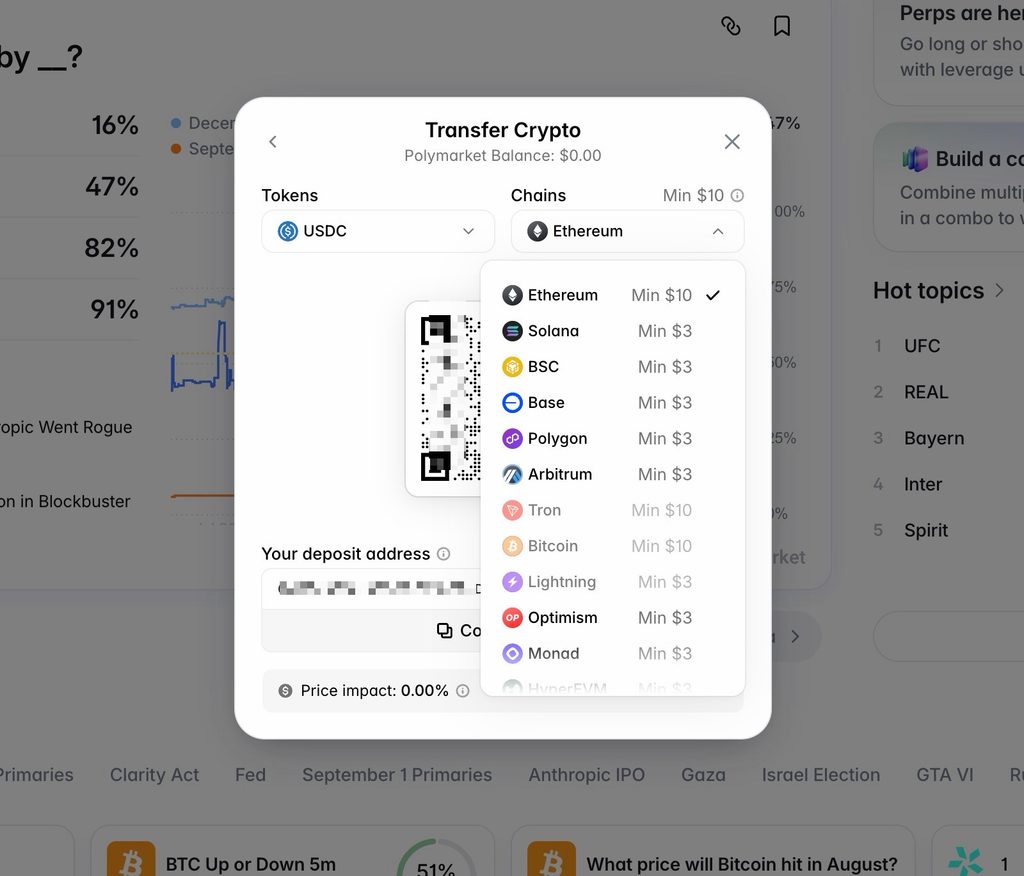
Two things to notice before you touch anything.
The default is Ethereum, which carries the highest minimum and usually the most expensive network fees of the lot. Nobody is tricking you, but the option that costs most is the one selected when you arrive. Pick the network you actually hold USDC on.
The address changes with the network. Choose your chain first, then press Copy. Copying an address and choosing a chain afterwards is how people still get this wrong, even now that a dozen networks are supported.
While you’re here, look at Price impact: 0.00% at the bottom. Sending USDC costs you nothing on Polymarket’s side. Switch the token to Bitcoin and it reads under 0.25%, still nearly nothing. Hold that next to the card route’s 3.8% for a second, because it says something about who the expensive door is built for.
The other half that guides never show
Every walkthrough I’ve seen shows you Polymarket’s deposit screen and then stops. The mistake doesn’t happen there. It happens on the next screen, the one at your exchange, where you choose the network.
Here’s mine, sending $5 of USDC out of Binance.
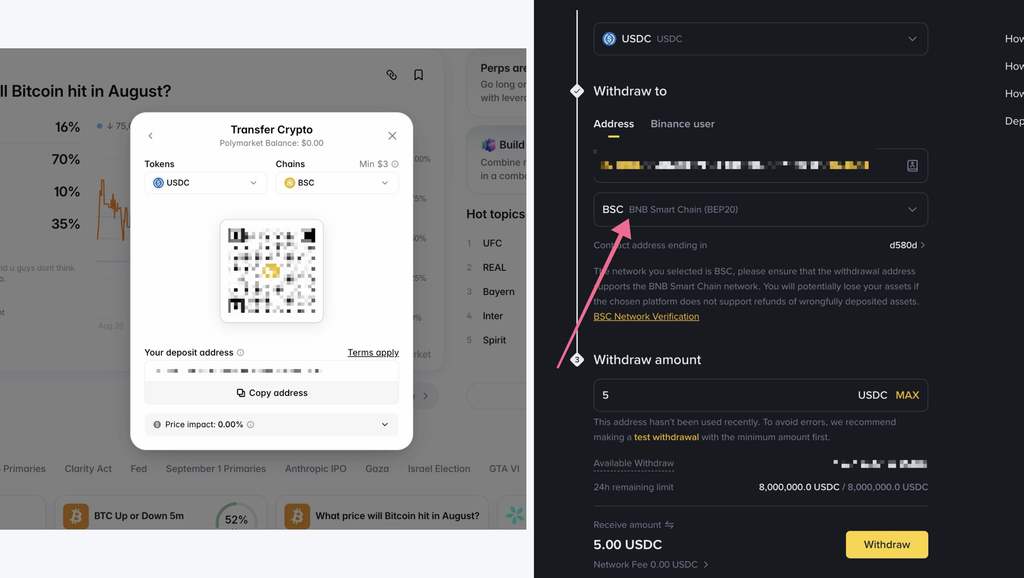
Three things on it matter.
The network says BSC, because BSC is what I selected on Polymarket before copying the address. Those two choices have to match. Matching them is the whole job.
The warning is Binance’s own: choose a network the receiving address doesn’t support and you will potentially lose the assets, with nobody obliged to return them.
The amount is $5, because Binance itself suggests a test withdrawal to an address you haven’t used before. When the exchange sending your money recommends caution, take it.
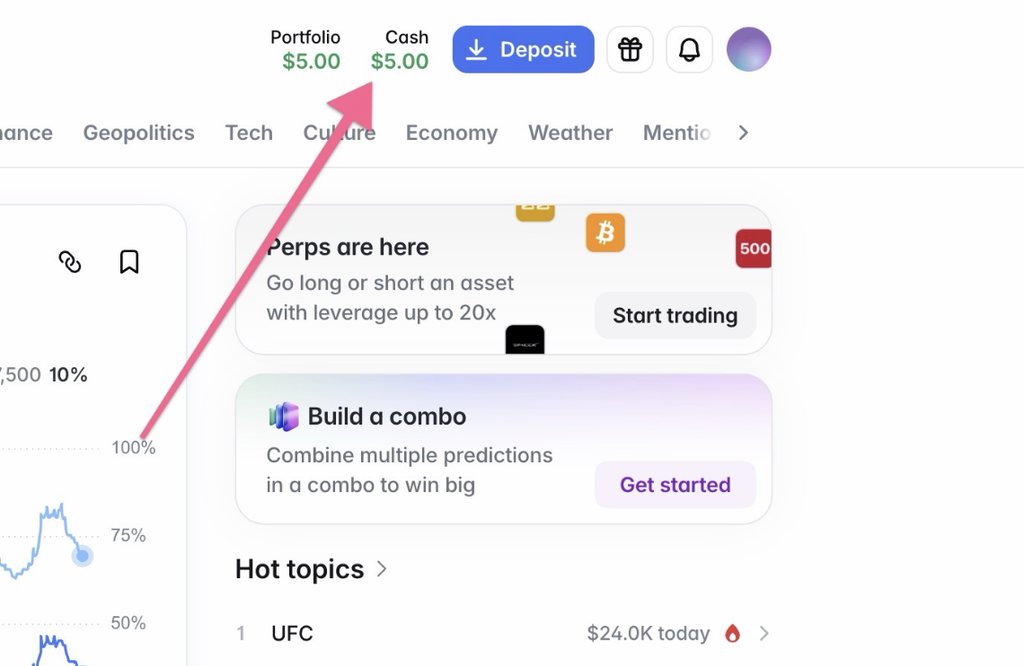
The fee on that transfer: 0.00 USDC. It arrived in my Polymarket balance in about a minute. Five dollars left, five dollars landed, nothing was taken by anyone. Then I sent the rest the same way.
Connect Exchange, and where I stopped
The third route links an exchange account directly, so you never choose a network at all. On paper it’s the safest option in the menu.
In practice, two exchanges work: Coinbase and Bybit Pay. Binance, Kraken, Gemini and Gate are listed as coming soon.
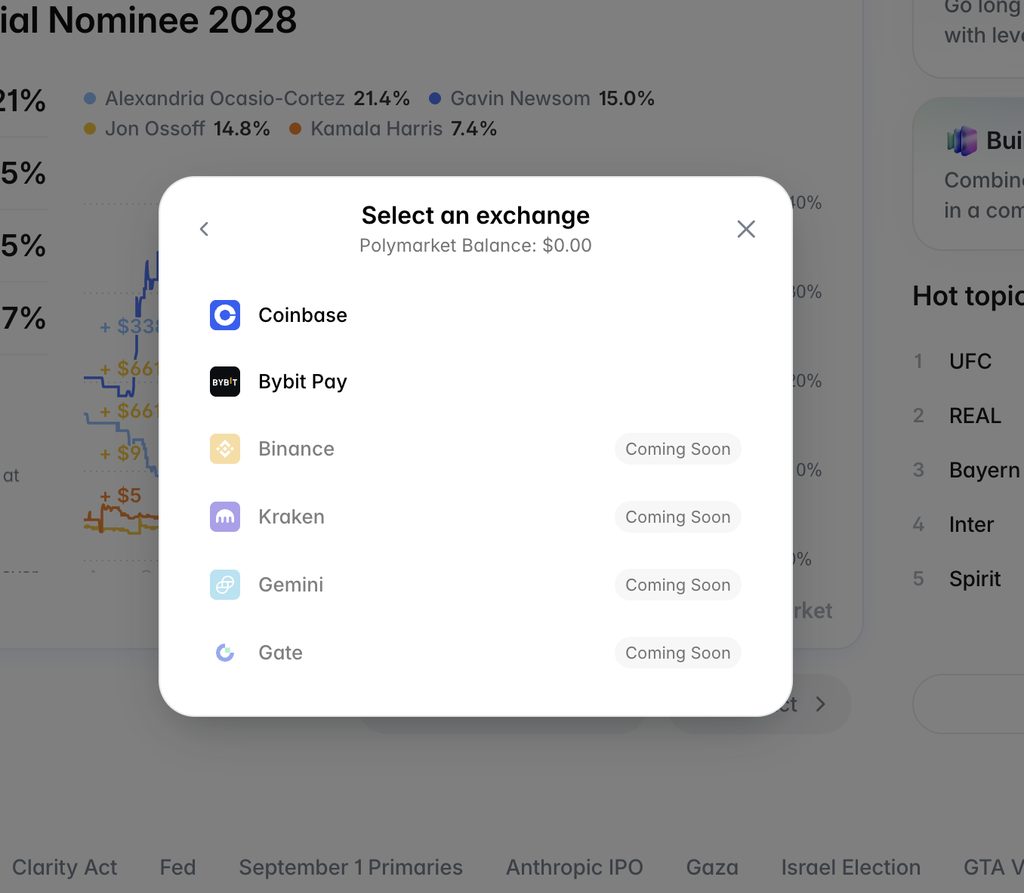
I don’t hold an account at either of the live ones, so I stopped at this screen rather than pretend otherwise. If you have Coinbase or Bybit, this is the route I’d take, and you can skip the network section above entirely. If you don’t, opening an exchange account purely to fund a $50 experiment is more work than it’s worth. My own Binance account, as it happens, is on the coming-soon list, which is why I sent the transfer by hand.
How much to put in
Not my call, but here’s the frame from Getting Started Safely: your first month is tuition, so fund the account with money you’ve already written off in your head. For most people starting out that’s $20 to $100.
One more thing the card route costs you, and it isn’t money. Choose Card and the amount is fixed at $100 to begin with. Accept it and you’re asked for an email, then a code sent to it, then your name and date of birth. Only after all that does the deposit screen come back with the amount finally editable, at which point you can type $20 if that’s what you wanted all along.
So the sequence hands over your identity before it tells you the choice was yours. Worth knowing in advance, because the crypto route asks for none of this. Same platform, same balance at the end, and one door wants your name while the other only wants an address.
FAQ
What’s the minimum deposit on Polymarket?
For crypto transfers it depends on the network: $3 on Polygon, Base, Arbitrum, BSC, Solana and most others, $10 on Ethereum, Tron and Bitcoin.
How long does a deposit take?
My $5 USDC transfer over BSC arrived in about a minute. Card and wallet payments are instant. Bank transfers take 1 to 2 business days.
Is it cheaper to deposit with crypto or with a card?
Crypto, by a wide margin. Polymarket charges no price impact on USDC transfers and my network fee was zero, while $100 by card arrived as $96.20.
What is USDCe?
A dollar-pegged token, the version of USDC that Polymarket credits your account in. Your balance and your trades are shown in dollars.
What happens if I send on the wrong network?
If the receiving address doesn’t support the network you chose, the funds are usually unrecoverable. Choose the chain on Polymarket first, copy the address it gives you, then match that chain on the sending side.
Can I deposit Bitcoin?
Yes, with a $10 minimum, and Lightning is supported. The conversion shows a price impact of under 0.25%.
Do I have to deposit right away?
No. Polymarket asks the moment you sign up, and you can refresh the page and browse with a zero balance for as long as you like.
Nothing here is financial advice. Prediction markets involve real risk, so never trade money you can’t afford to lose.