
There are several ways to sign up, and nobody explains what choosing between them means for your money. Any of them takes about a minute. The part worth slowing down for is what you’re agreeing to and who holds the keys afterwards.
Guide 1 of 5 · screens as of August 2026
What you’ll need
- A Google account or an email address. That’s it.
- Two minutes.
- No money. Funding is guide 2, and there’s no reason to rush it.
These guides cover Polymarket Global, the international exchange at polymarket.com. If you’re in the US, that version is blocked for you and has been since a 2022 settlement with the CFTC. Polymarket US is a separate product that works differently, and these screens won’t match it. Which is which →
Where to get the link
Scam sites buy ads on Polymarket’s name and register look-alike domains, so a search result or a typed-in guess can land you on a convincing clone. Use a link from a source that puts its name behind it, then bookmark the real address and use the bookmark from then on.
Disclosure: that’s my referral link. Polymarket’s program pays referrers a cut of the trading fees their referrals generate, and it pays the person signing up nothing at all. No bonus, no fee discount, no better terms. It also pays me nothing at the moment, because their program only starts paying out once my own lifetime trading volume passes $10,000, and it hasn’t. Use the link if you’d like to support the site, or go to polymarket.com directly. Same product, same price.
Step 1: Open the sign-up window
Click Sign up in the top right corner.
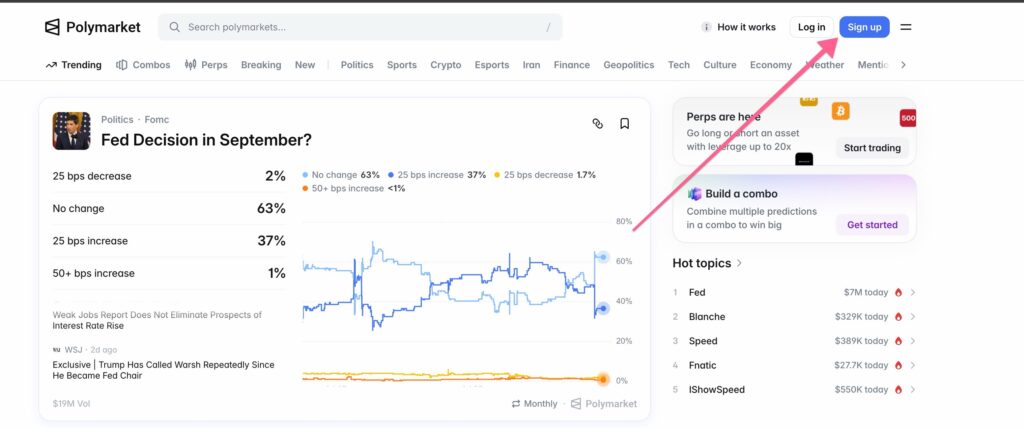
A window headed Welcome to Polymarket appears with three ways in:
- Continue with Google. One click, nothing to remember.
- An email address. Type it in and hit Continue.
- A wallet or app you already use. A row of icons underneath, including MetaMask, Telegram and several others.
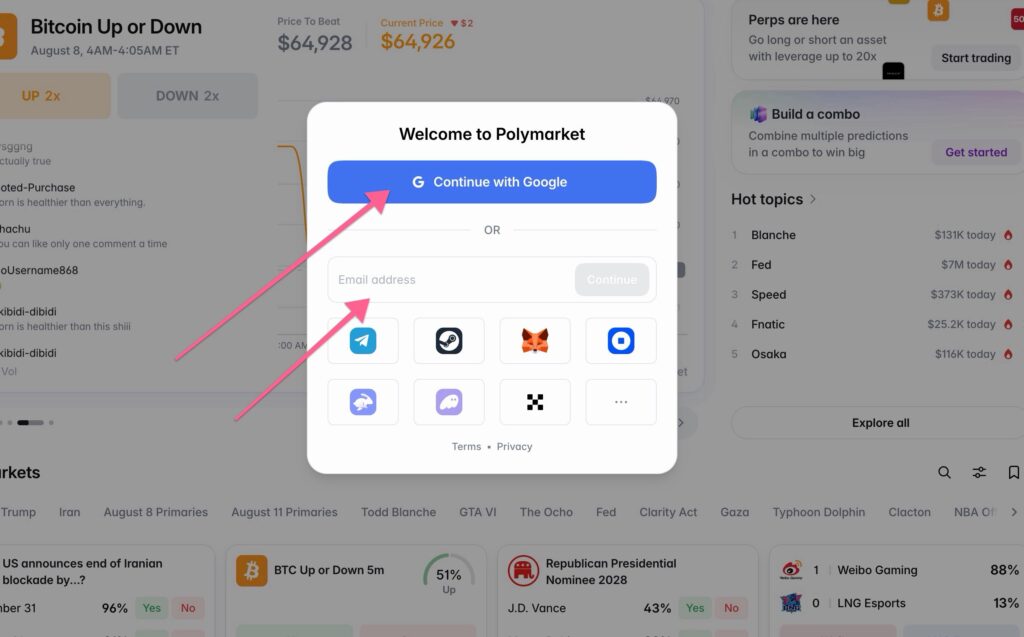
Which to pick
If you’ve never used crypto, take Google or email. You’re here to learn how prediction markets work, and connecting your own wallet adds a second skill where the mistakes can’t be undone. Start simple, keep the amounts small, and move to your own wallet later if you decide you want that control. The honest trade-off in one line: with Google or email, your access depends on that login staying yours and on Polymarket’s wallet setup continuing to work. With your own wallet, it depends entirely on you never losing your recovery phrase.
One thing that surprised me: there’s no confirmation email and no link to click. The account exists the moment you pick a method. Convenient, and worth a pause, because whatever login you chose is now the only key to this account. If you used Google, your Google account is what’s protecting your money. Turn on two-factor authentication there today if it isn’t on already.
Step 2: Choose a username
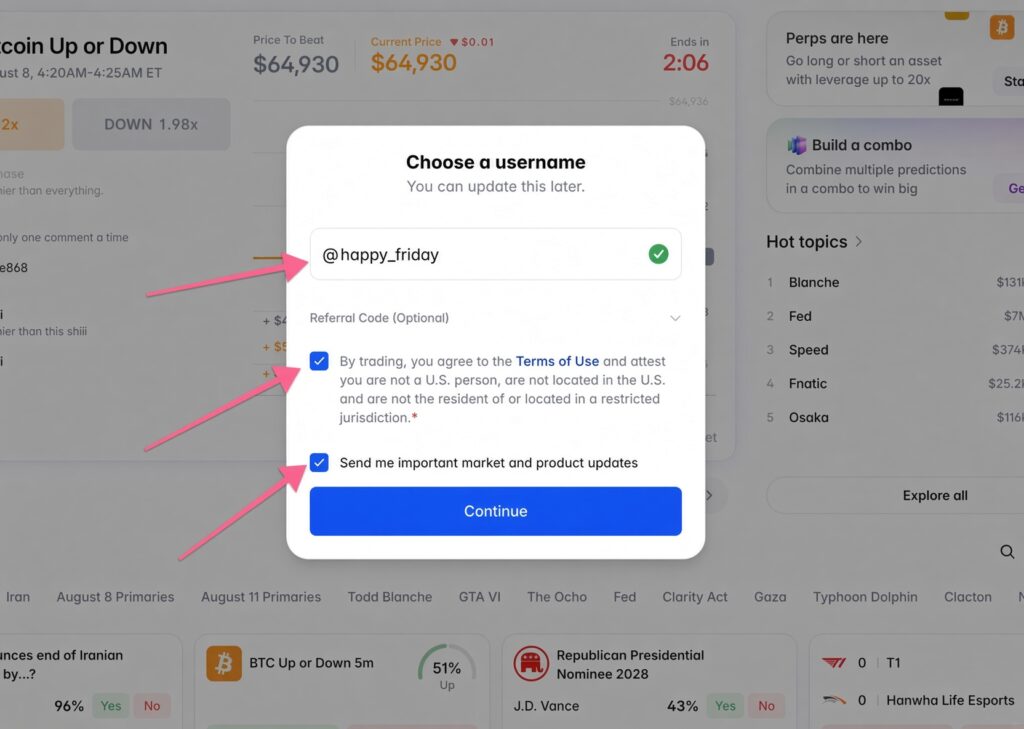
Polymarket asks for a username and tells you that you can change it later. That’s true, and it’s also slightly misleading. Your username is public, and so is everything attached to it. Polymarket profiles show trading activity, so anyone who knows your name can see what you’ve been buying, at what size, and how it went. The wallet underneath sits on a public blockchain as well, which means the record outlives any name change you make afterwards. So don’t reuse a handle that’s already tied to your real name. Sign up as the same thing you use on your work profile and you’ve just published your trading record under it. Something unconnected works fine: bluepencil, quiet_tuesday, marketmoth.
Step 3: Read the checkbox before you tick it
This is the only part of the sign-up that carries any weight. The box says you agree to the Terms of Use and attest that you are not a US person, are not located in the US, and are not a resident of or located in a restricted jurisdiction. You’re making a factual statement about yourself there, so treat it as one. If any part of it isn’t true, this is where to stop, and the legal picture explains what’s at stake.
The second box, “Send me important market and product updates”, comes pre-ticked. Untick it if you’d rather not. Then click Continue.
Step 4: You’re in, now close the window
The moment your account exists, Polymarket puts a Fund Your Account box in front of you with a single Deposit Funds button and no way to close it. Clicking outside does nothing. Refresh the page, and it disappears.
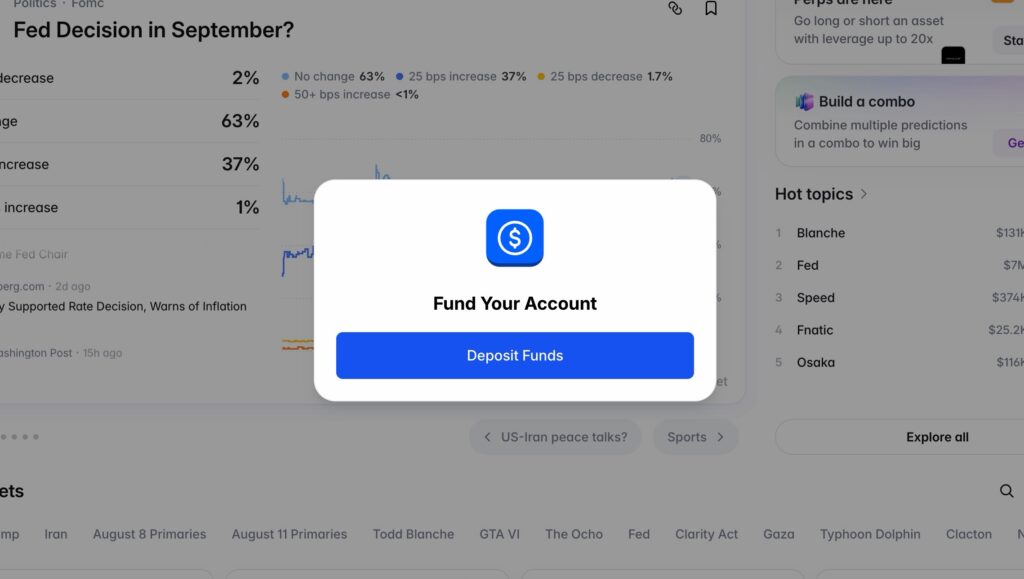
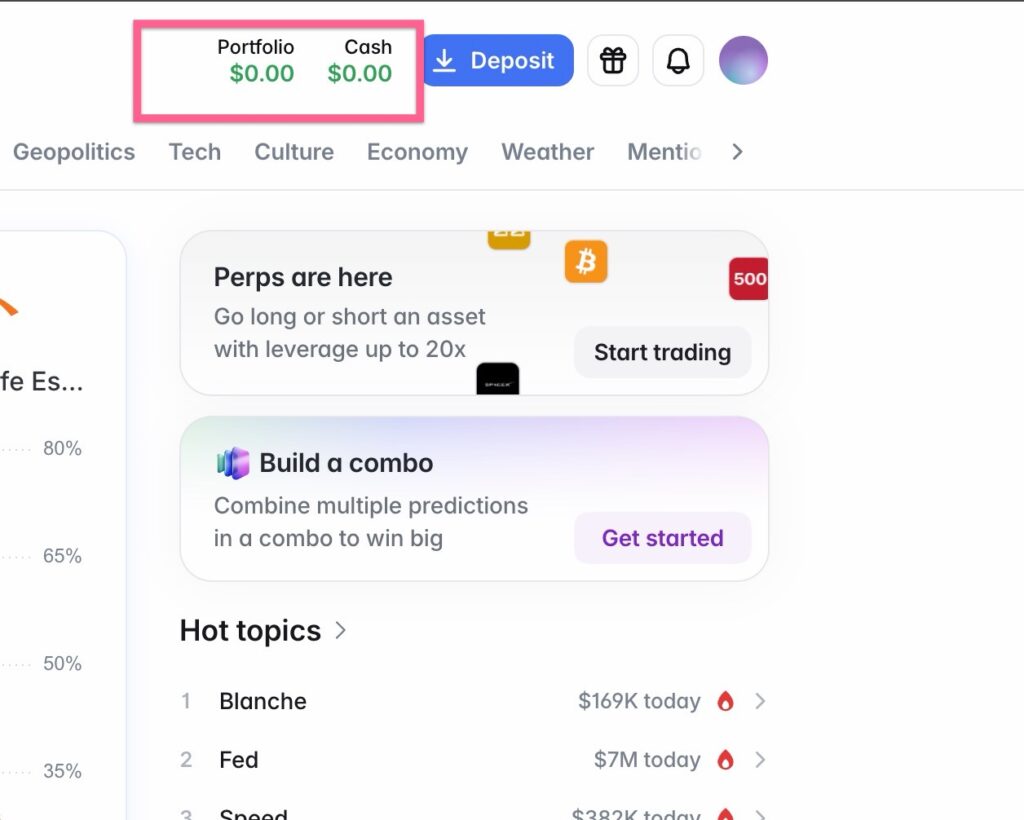
The product just asked for your money before you had seen a single market. You don’t owe it an answer yet. Browsing with a zero balance is free, and nothing about a funded account makes you better at this. What a finished account looks like:
While you’re here, spend ten minutes looking around with an empty balance.
What’s next? Guide 2: Fund your account covers getting money in, including the one mistake that permanently loses people their deposit. Read it before you send anything, and send a small test amount first.
FAQ
Do you need ID to sign up for Polymarket?
Not to create an account or to trade. Depositing by card is a different matter: that route asks for an email code, your name and your date of birth before it lets you finish. Crypto deposits ask for none of it.
Is there a confirmation email?
No. The account is created immediately when you choose a sign-up method, with no link to click.
Does it cost anything to create an account?
No. Signing up and browsing are free. Costs begin when you fund and trade.
Can I change my username later?
Yes, Polymarket says so on the sign-up screen. Your trading history stays attached to the same wallet regardless, so the new name doesn’t hide the old activity.
Can I use Polymarket from the US?
Not this version. The international exchange has been geo-blocked from the US since 2022, and Polymarket prohibits using a VPN to get around it. Americans need Polymarket US, which is a separate platform.
Why can’t I close the Fund Your Account window?
There’s no close button on it. Refreshing the page clears it, and you can browse markets without depositing anything.
Nothing here is financial advice. Prediction markets involve real risk, so never trade money you can’t afford to lose.